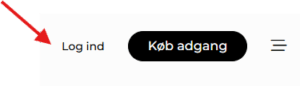
You log in to your subscription via the media site where you purchased it. If you have subscriptions to multiple media sites, you use the same login details for all of them.
Follow this guide:
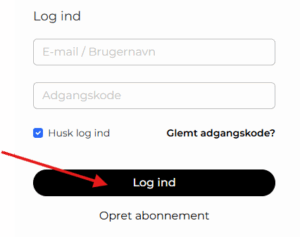
Your email address is always your username for all logins. If you have forgotten your password, you can use “Glemt adgangskode?” You will then receive an email with a link that allows you to reset your password.
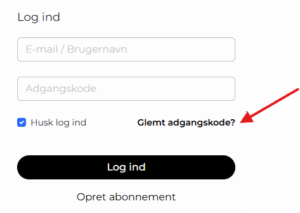
NOTE: If you do not receive an email, it may have ended up in your spam folder, or your company may have a block on external emails.
If you have any other questions, you are always welcome to contact us at abonnement@nordiskemedier.dk or call us at +45 72 28 69 70.
If you have changed your address, or if the house number is hard to see, this may be the reason for missed deliveries. Please send us updated information so we can ensure that your address is correct in your customer profile.
Please note that we unfortunately cannot deliver the newspaper on the same day, but we can send it to you afterward so that it arrives as quickly as possible.
Skifter du adresse, e-mail eller lignende, skal du huske at informere os, så din avis, vigtig information eller faktura kan blive sendt det rette sted hen. Du bedes sende en mail til abonnement@nordiskemedier.dk with your customer number or contact information and the desired changes.
If you wish to have an invoice resent, please send an email to abonnement@nordiskemedier.dk with your customer number indicated.
If you have received an invoice from Nordiske Medier with errors or omissions, you can contact us at abonnement@nordiskemedier.dk
Please provide your customer number,, invoice number, and a description of the issue.
Scam / Spam
Unfortunately, we have encountered companies that have posed as Nordic Media’s media or have had a name that can easily be confused with one of our media outlets. If you have received an invoice that you are skeptical about, please write to abonnement@nordiskemedier.dk.
If you have received a reminder without having received the original invoice, or if you have any other questions regarding a reminder, please contact us at abonnement@nordiskemedier.dk Please remember to provide your customer number.
If you have any other questions regarding your invoice, or if there are any uncertainties on an invoice, you are always welcome to write to abonnement@nordiskemedier.dk Please remember to provide your customer number.
All of our media send out newsletters, and you can subscribe to them on the respective media sites. The frequency and timing of newsletters vary from one publication to another. You will find information about this on each media site.
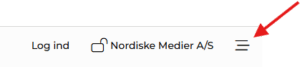
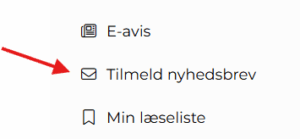
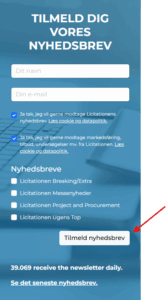
Shortly after, you will receive an email asking you to confirm that you wish to receive the newsletter.
If you no longer wish to receive our newsletters summarizing the most important industry news of the day, you can always unsubscribe directly in the specific newsletter. Simply click “Afmeld” at the bottom of the newsletter.

You log in to your membership via the media site where you purchased it. If you have a membership to multiple media sites, you use the same login details for all of them.
Follow this guide:
Your email address is always your username for all logins. If you have forgotten your password, you can use “Glemt adgangskode?” You will then receive an email with a link that allows you to reset your password.
NOTE: If you do not receive an email, it may have ended up in your spam folder, or your company may have a block on external emails.
If you have any other questions, you are always welcome to contact us at abonnement@nordiskemedier.dk or call us at +45 72 28 69 70.
Yes, you can easily change the email address associated with your membership. You can do this through your user settings. Follow the guide below:
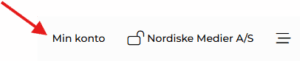
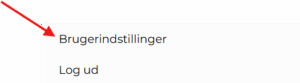
Here you can update your personal information:
If you have trouble changing your email address, you can contact customer service: Phone: 7228 6970 or mail: medlemskab@nordiskemedier.dk.
To edit your profile, click on “Min konto” in the top right corner once you are logged in. Then click on “Virksomhedsprofil” and select “Rediger profil”.
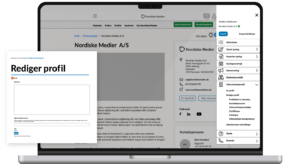
Here you can update your company description, change or add a logo, edit your email and phone number, add a link to your website, include up to three featured contacts, and much more.
The membership platform is an effective marketing tool for B2B companies in Denmark, Norway, and Sweden.
With a membership, you gain a direct channel to your industry, where you can share news, courses, jobs, and products on the largest news media. This way, you reach exactly the decision-makers, customers, and partners that matter to your business.
If you have questions about how to make the most of your membership, you can find answers to frequently asked questions in our FAQ section after logging in. Click “Min konto” and select “Hjælp” from the menu. Here you will find guidance on everything from getting started with your membership to details about user management.
Are you looking for new, skilled employees? As a member, you have the opportunity to reach the right candidates in the industry in an effective and easy way through job postings.
Click on “Min konto” in the top right corner once you are logged in. Then click on ‘Create post‘ and then select ‘Job‘. You can now fill in the details of your job posting.
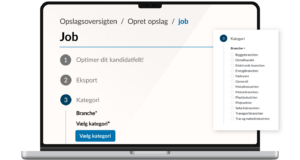
As a member, you also have the opportunity to increase the visibility of your job postings through our collaboration with Denmark’s largest job portal, Jobindex. When you create a job posting here, it is automatically displayed on Jobindex as an ad link, at no extra cost.
If you have further questions about your job postings, you can find answers in our FAQ section in your member profile. Click on ‘Min konto‘ and select ‘Hjælp’ in the menu. Here you will find answers to frequently asked questions about membership.
The membership platform is exclusively a marketing tool. Your membership does not provide access to the locked articles.
If you wish to access all articles and other content, a subscription to the media from which you want to read articles is required.
To create a new administrator, click on ‘Min konto’ in the upper right corner.
Select ‘Virksomhedsprofil. Then click on ‘Administratorindstillinger’.
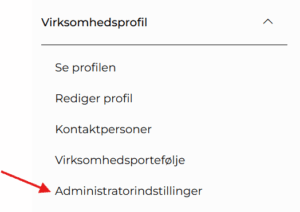
Click ‘Tilføj administrator’ and then enter the name, title, email address and phone number of the administrator. You can also upload a profile photo here if you want an image of the administrator.
The new administrator will now receive an email where they must confirm the change.
To remove an administrator user from your membership, click on ‘Min konto’ in the upper right corner.
Select ‘Virksomhedsprofil’. Then click on ‘Administratorindstillinger’.
Here you will find the list of administrators. To the right of each administrator, you will find a trash can icon. Click this to remove the selected administrator.

To create a membership ecosystem that benefits everyone, we have established the following guidelines that all members of the Nordic Media membership platform must comply with.
With your profile, you have an excellent platform to tell potential customers who you are, what you stand for, and the value you create. Therefore, only include information about your own company on your profile. The same applies to all posts you publish on the platform: write only about your own company, not about other companies or individuals — including in product comparisons.
By adding links to your profile and the posts you create, you can strengthen your SEO value and direct customers to your websites and social media channels. Therefore, only insert links that lead to your own websites.
If your posts are not aligned with the media and categories you publish under, your content will not be targeted to the correct audience. This benefits neither your customers nor your business. Therefore, select only the media and categories that are relevant to your post.
By regularly updating your sales posts, you keep your target audience engaged with your latest news, products, and services. For that reason, wait at least 3–4 weeks before publishing the same sales post again in the newsletter. The same applies to news posts — avoid creating duplicate news posts, as this reduces your relevance and weakens the overall news value of the medium.
You are welcome to create all the sales posts you need under your profile. However, only one post per product may exist at a time. If you wish to recreate a sales post with a new text or headline, please delete the previous version first.
To ensure that all members have the opportunity to showcase their stories and products in the newsletter, there are limits on how many posts you may publish there:
Sales posts: You may publish a maximum of 2 different sales posts per week in the newsletter.
News posts: You may publish a maximum of 1 news post per day in the newsletter.
Job postings must not be published as a general membership post. Job posts should be published in the job bank and/or under “Jobs in Focus”.
On Nordiske Medier’s membership platform, you may only publish news that you have created yourself. If another media outlet has written an article about your company, you may only publish it on the membership platform if you have an agreement with the journalist who wrote the article, as the rights belong to the original author.
If the above guidelines are not followed, Nordiske Medier reserves the right to make changes to or delete posts from the membership platform.
If you change your address, email, or similar details, please remember to inform us so your newspaper, important information, or invoice can be sent to the correct place. Please send an email to medlemskab@nordiskemedier.dk with your customer number or contact information and the desired changes.
If you wish to have an invoice resent, please send an email to medlemskab@nordiskemedier.dk with your customer number indicated.
If you have received an invoice from Nordiske Medier with errors or omissions, you can contact us at medlemskab@nordiskemedier.dk
Please provide your customer number,, invoice number, and a description of the issue.
Scam / Spam
Unfortunately, we have encountered companies that have pretended to be one of Nordiske Medier’s media outlets or have had a name that is easily confused with one of our media brands. If you have received an invoice that you are skeptical about, please write to medlemskab@nordiskemedier.dk.
If you have received a reminder without having received the original invoice, or if you have any other questions regarding a reminder, please contact us at medlemskab@nordiskemedier.dk Please remember to provide your customer number.
If you have any other questions regarding your invoice, or if there are any uncertainties on an invoice, you are always welcome to write to medlemskab@nordiskemedier.dk or contact customer service at tel.: 7228 6970. Please remember to include your customer number.
If you wish to cancel your membership, you can contact our customer service at tel.: 7228 6970 or at email: medlemskab@nordiskemedier.dk
Missing payment is considered not as a cancellation. Applicable terms and conditions for membership can be read here.
Specifically for HTML5 banners
When delivering HTML, we need to receive a zip file containing all the source material. The zip file must not exceed 1 MB in size. It is advisable that the HTML5 file stays within a 15-second duration. HTML5 files can only be used for banners on the portal, as this file type cannot be handled by email programs.
If HTML and script banners are not made responsive, a fallback banner must be provided for use on mobile and tablet screens.
Booked ads are displayed on the media page where they are booked. Since the ads rotate with others, they may not necessarily be visible all the time. Try refreshing the page a few times to display your ads.
For further information, you can also contact us at online@nordiskemedier.dk.
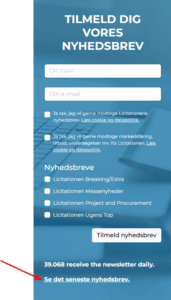
Your booked ads will be displayed during the scheduled period in the newsletter of the respective medium. You can view the latest sent newsletter by going to the media page and selecting “Tilmeld nyhedsbrev” in the menu.
Click on “Se det seneste nyhedsbrev” at the bottom of the form.
You are always welcome to contact us at online@nordiskemedier.dk if you have further questions.
Yes, we offer assistance with the graphic design of your online ads.
If you need a designer to help with your layout, the following requirements apply to images, logos, and text:
Images must be at least 200 / 300 DPI, depending on whether the ad is for a newspaper or magazine, and in the file formats .jpg, .tiff, .eps, .psd, or .png.
Logos and graphic elements must be provided as .eps or .ai vector files.
Text should be sent separately in a .docx file or in the email with the material.
Banners are created free of charge when banners are ordered for a minimum of 2 months; otherwise, the price is 500 DKK per banner.
You can read more about technical specifications and formats for each medium at the bottom of the individual media page. See the overview of all media here.
We need all materials for production at least 10 days before the ad campaign is scheduled to start.
Completed ad material including a link to the website should be sent to online@nordiskemedier.dk
No. All advertising in the newsletter must be static images to ensure that all newsletter recipients can view all content in the mailing.
If you want animated advertisements, this is possible on our media pages. Here, all banners can be either static or animated – HTML5, gif, or script – with the exception of the title banner.
Contact us at online@nordiskemedier.dk and learn more about your advertising options.
Yes, we can. Statistics for graphic advertising can be obtained by contacting your consultant or sending an email to online@nordiskemedier.dk.
If you would like insight into your order, you can contact the consultant you purchased the order from, or contact us via email at online@nordiskemedier.dk